
Tri-screen portable monitors aren’t for the faint of heart
Living in a cramped New York apartment forces anyone who works at a desk to stretch every square inch for productivity. What the X90G Actually Is The X90G is a portable unit that slots three 15.6‑inch IPS panels around a laptop.
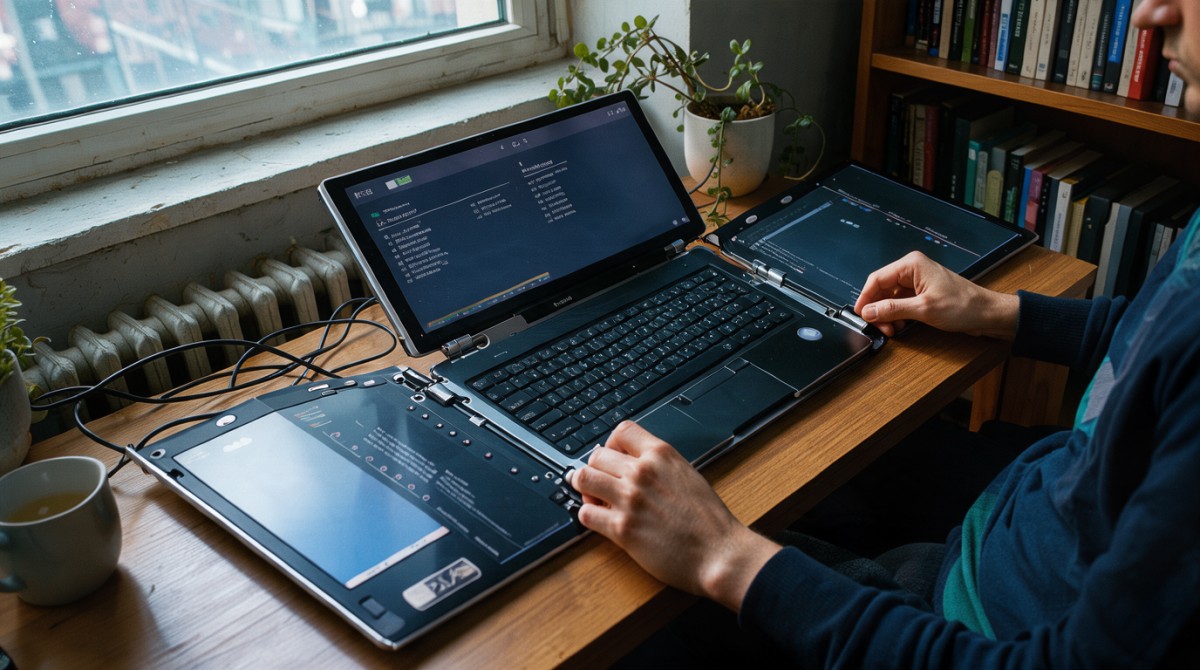
Living in a cramped New York apartment forces anyone who works at a desk to stretch every square inch for productivity. That reality pushed me, a seasoned journalist who’s spent countless nights hunched over a laptop in tiny cafés, to test the latest in portable‑screen technology: a three‑screen monitor that promises a full‑blown multi‑monitor setup without the bulk of a traditional desktop rig. The device I examined, KYY’s X90G, is marketed as a “tri‑screen portable monitor,” and it delivers on the promise of extra real estate—but it also reveals the hard limits of trying to cram three full‑size displays into a portable package.
What the X90G Actually Is
The X90G is a portable unit that slots three 15.6‑inch IPS panels around a laptop. Each panel runs at a native 1920×1080 resolution and can reach up to 400 nits of brightness, which is respectable for a device meant to be used on the go. Priced at $360 at the time of testing, the monitor sits in the mid‑range of portable‑screen offerings, and it supports Windows, macOS (on M1‑class or newer chips), Linux and Android. That breadth of OS compatibility is a notable advantage over many rivals that limit themselves to Windows and macOS.
Design‑wise, the X90G differs from competitors that mount all three screens above the laptop. Instead, it places one panel on each side of the laptop and a third above the lid, creating a “U‑shaped” visual envelope. The back of the unit doubles as a kickstand, allowing the whole assembly to sit upright on a tabletop or tilt back for a more ergonomic angle. However, the design also introduces a series of ergonomic compromises that become apparent once the unit is in use.
Physical Footprint and Portability Trade‑offs
The most immediate hurdle is size. With the side panels flattened, the X90G spans roughly 46 inches across—wider than many standard desks. Even with the side panels folded inward, the unit still demands a generous tabletop footprint and a clear area behind the laptop to accommodate the top panel. For anyone whose workspace is already limited, that extra width can feel like a deal‑breaker.
Weight is another consideration. At 6.4 pounds, the X90G weighs more than twice as much as the ultralight Dell XPS laptop I paired it with. While the mass is understandable given three full‑size screens, it undermines the “portable” claim for anyone who expects to lug the device between meetings or co‑working spaces. In practice, the monitor feels more like a semi‑stationary accessory that you set up once and leave in place, rather than a truly mobile peripheral.
How It Performs in Real‑World Use
When I connected the X90G to a 13‑inch laptop, the experience was a mixed bag. The unit’s back panel, which serves as a handle, has a cut‑out where the laptop’s lid sits. Because the 13‑inch screen didn’t fully cover that opening, a visible gap remained, exposing part of the monitor’s bezel and the top screen. That gap created a visual distraction, especially when the top panel lit up and drew the eye away from the primary laptop display.
Beyond the visual distraction, the arrangement of the three screens never quite felt like a single, seamless workspace. The side panels sit slightly forward of the laptop’s screen, and the top panel sits at a different height altogether. Moving the cursor between screens required awkward, sometimes imprecise mouse movements, especially when transitioning from the laptop screen to the top panel. The lack of a perfectly aligned row meant the mouse had to “jump” over a physical gap, which can slow down workflow for tasks that demand rapid cursor movement.
Brightness, Controls, and Independent Adjustments
One of the X90G’s strengths is the independent control each panel offers. Every screen has its own on‑screen display menu, brightness slider and power button. In practice, this lets you dim the side panel you’re using for reference material while keeping the primary screen bright for reading or editing. For example, while drafting an article on the laptop screen, I could lower the brightness on the side panel displaying a photo‑editing app, reducing eye strain and conserving battery life.
The 400‑nit brightness ceiling is adequate for most indoor environments, though it may struggle in brightly lit cafés or outdoor settings. Still, the ability to tweak each panel separately adds a layer of customization that many dual‑screen portable monitors lack, giving power users a degree of flexibility that can justify the extra hardware.
Use Cases That Actually Benefit
For certain workflows, the X90G shines. Journalists, analysts and anyone who juggles multiple reference documents can keep a spreadsheet, a research article, a chat window and a primary writing document all visible at once. In my tests, I used the top panel for a live feed of a Finnish puppy cam—a light‑hearted distraction that didn’t interfere with the core work but provided a quick visual break.
The independent tilting of each side panel also makes it easier to angle screens for collaborative viewing. When sharing a document with a colleague across a desk, you can angle the side panel toward them without rotating the entire unit. This “share‑first” capability is something a single large monitor can’t replicate without additional hardware.
When the X90G Misses the Mark
Despite its advantages, the X90G is not a universal solution. Users who value a clean, minimalist desk will find the three separate panels visually noisy. The gaps between screens, the visible bezels and the constant need to shift focus between disparate displays can erode concentration rather than enhance it. Moreover, the unit’s bulk makes it ill‑suited for true on‑the‑move scenarios—think hopping between client sites or traveling on a train.
Another limitation is compatibility with larger laptops. The X90G’s chassis accommodates laptops up to 17.3 inches, but many gaming or workstation laptops exceed that size, rendering the monitor unusable with those machines. For professionals who rely on high‑performance laptops, the X90G may simply not fit.
Bottom Line: A Niche Tool for Power Users
The X90G delivers on its headline promise: three full‑size portable screens that expand your visual workspace dramatically. It does so with respectable brightness, solid OS support and independent controls that can streamline multitasking. However, the trade‑offs—size, weight, visual discontinuities and ergonomic awkwardness—mean it is best suited for a specific audience: power users who have a semi‑permanent desk space, need to run multiple applications side by side, and can tolerate the extra bulk for the sake of added screen real estate.
If you’re a journalist like me, constantly toggling between research, drafting, and multimedia editing, the X90G can be a game‑changer—provided you have the desk space to accommodate it and you’re comfortable treating it as a semi‑stationary workstation rather than a truly portable accessory. For anyone else, especially those who prioritize a tidy workspace or need a lightweight monitor for frequent travel, a traditional dual‑screen portable monitor or a single larger external display will likely serve you better.
This article was produced with AI-assisted research and editorial support. Reporting is based on the source material cited below. Sources: Ars Technica; arstechnica.com; Global1.News (23 November 2026).
By Jessica Ali, Staff Writer
What's Your Reaction?
 Like
0
 Dislike
0
 Love
0
 Funny
0
 Wow
0
 Sad
0
 Angry
0

Editor-in-Chief at Global1.News. Atlanta-based journalist who cuts through the BS and tells it like it is. Lead anchor, host, and the voice you hear when the spin stops and the truth starts.














Comments (0)