
From minimalist to maximalist: Ars staffers show off their home offices
Ars Technica has built its reputation on a remote‑first culture, a model it has adhered to since its launch in 1998. Remote‑first roots: why Ars never needed a central office From its inception, Ars Technica embraced a model that sidestepped the traditional newsroom layout.
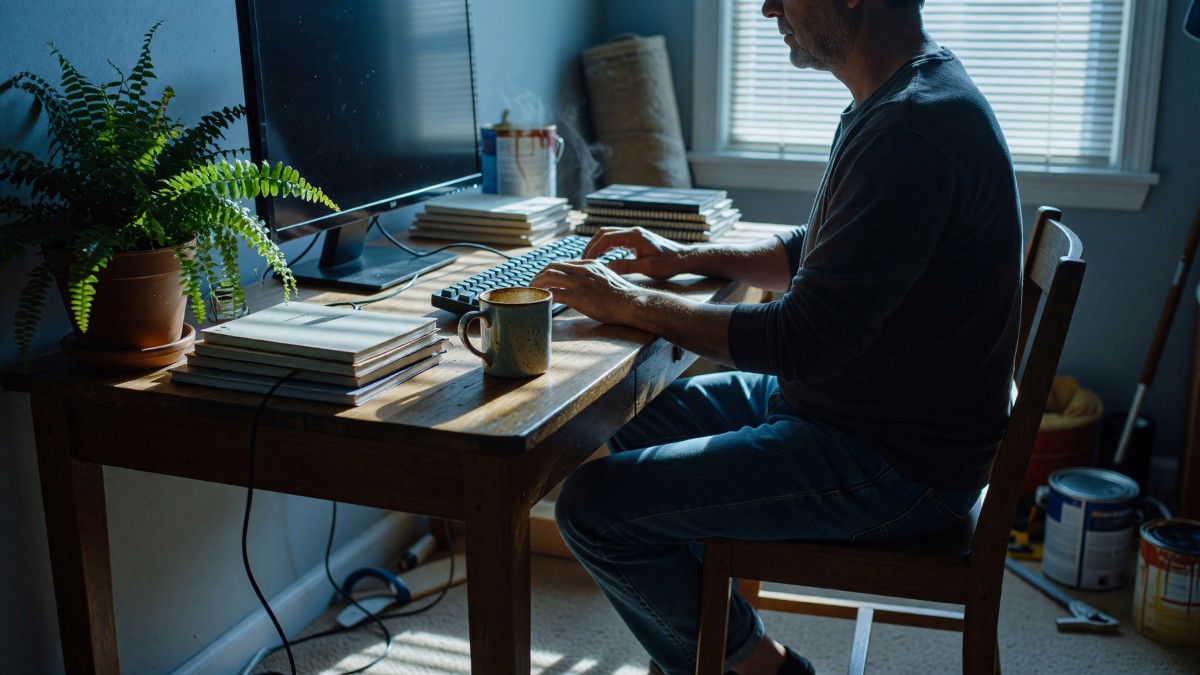
Ars Technica has built its reputation on a remote‑first culture, a model it has adhered to since its launch in 1998. The outlet never erected a single, centralized headquarters, a decision that has turned commuting into a non‑issue for its staff and insulated the newsroom from the traffic snarls that plague many other media operations. In a recent feature, Ars opened the doors to its employees’ home workspaces, revealing a spectrum that stretches from bare‑bones laptop corners to elaborate hobby‑laden labs. The variety on display not only underscores the flexibility of remote work but also highlights how personal preferences, family dynamics, and budget constraints shape the day‑to‑day reality of a tech journalist’s desk.
Remote‑first roots: why Ars never needed a central office
From its inception, Ars Technica embraced a model that sidestepped the traditional newsroom layout. The outlet’s founding principle was simple: let writers, editors, and developers work from wherever they could be most productive. This philosophy has paid dividends in two concrete ways. First, the absence of a central office eliminates the daily commute, a factor that research consistently links to reduced stress and higher job satisfaction. Second, the distributed setup insulates the organization from localized disruptions—whether a subway strike in New York or a snowstorm in the Midwest—because each employee can simply log in from home or a nearby café.
The remote‑first stance also aligns with the broader tech industry’s shift toward flexible work arrangements. While many companies have experimented with hybrid models, Ars has remained steadfast, allowing its staff to choose work environments that suit their lives. This continuity explains why the outlet can now showcase a mosaic of home offices that reflect the personal histories and spatial constraints of its workforce.
Jeremy Hsu’s New York corner: minimalist on a budget
One of the most striking setups belongs to Jeremy Hsu, who lives in a compact New York City apartment. Hsu’s workstation occupies a modest corner, a space he shares with occasional forays to cafés and coworking hubs. His configuration is deliberately lean: a basic monitor perched on a stack of books—among them Mary Beard’s “SPQR”—paired with a work laptop. The laptop, an Apple M4 MacBook Air, rests on the side while Hsu uses a battered pair of Sennheiser HD 518 headphones for background music.
Peripheral devices are limited to a Lekvey ergonomic mouse and a Logitech K380 keyboard, both of which Hsu can easily transport to public workspaces. He also keeps a simple standing desk, though he admits the mechanism is cumbersome and not suited for frequent height changes. Seating alternates between an Ikea wooden chair and a more ergonomic alternative, reflecting a pragmatic approach to comfort without the expense of high‑end office furniture.
Personal touches add warmth to the otherwise spartan desk: a painted dinosaur sculpture gifted by his son, two copies of the Spot It! matching game for family downtime, and a pair of Powerblock dumbbells tucked beneath the surface for quick 15‑minute workouts. Hsu’s setup illustrates how a journalist can maintain productivity with a modest budget while still carving out space for family and health.
Basement lab: a hobbyist’s haven
Another Ars staffer offers a stark contrast with a basement “hobbit hole” that doubles as a workshop and a tech command center. The desk sits opposite a workbench laden with decades‑old PC parts, tools, and cables—all neatly labeled, a marked improvement over previous storage in unlabeled tubs. The core of the computing rig is an AceMagic W1 mini PC running Fedora, complemented by a Blackview Intel N150 on Windows for audio recording, a nod to the quirks of PipeWire on Linux.
Both machines feed into a KVM switch, allowing seamless toggling between operating systems. Display hardware is a collection of thrifted finds: an HP monitor, a Sansui monitor, and an old Samsung LCD TV acquired for a nominal price at a thrift store, now repurposed as a third monitor for streaming PC content. An Onn Android box and a Lenovo ThinkSmart View—modified to run LineageOS—handle smart‑home controls and monitor solar production, showcasing a blend of DIY ingenuity and sustainable tech practices.
The workspace also houses a Flashforge 5M 3D printer, a pegboard adorned with Mega Man figures and a decade’s worth of convention badges, and a back closet brimming with legacy consoles, spare drives, and prototype boards. A Dowinx gaming chair, snagged from a deal site, provides seating, though the author cautions against recommending it. The overall vibe is one of a personal maker’s studio, where professional duties intersect with long‑standing hobby projects.
Windows‑centric power station: high‑end hardware for a pro
In a third example, a staff member who leans heavily on Windows describes a custom‑built PC assembled in early 2024. The machine features a Raptor Lake Core i7 processor—remarkably untouched by the overvolting bug that plagued some early units—and an RTX 4070 Ti graphics card. This setup reflects a commitment to performance and future‑proofing, despite the volatile component prices that have plagued the market in recent years.
The primary display is an Alienware ultrawide OLED, originally purchased for gaming but now serving as a spacious productivity canvas. Above it sits an Asus ProArt LCD calibrated in sRGB, dedicated to photography work. Input devices include a Logitech MX Vertical mouse, chosen specifically to mitigate carpal tunnel symptoms, and a Logitech K380 keyboard for portability. The workstation rests on a Flexispot motorized sit‑stand desk with a rubberwood butcher‑block top, a surface the author has expanded with an additional rubberwood slab to support a cantilevered shelf.
Ergonomic considerations extend to the chair: a Herman Miller Aeron, praised for its adjustability but critiqued for a hard mesh surface. The author advises purchasing the chair on sale and adding a cushion for comfort. Above the desk, personal artwork—Star Trek cross‑stitches crafted by the employee’s spouse—adds a humanizing touch to an otherwise high‑tech environment.
Balancing clutter and order: the art of workspace curation
Across the three profiles, a common thread emerges: the tension between creative clutter and the need for order. The basement lab’s pegboard and labeled drawers demonstrate a systematic approach to tool storage, while the Windows‑centric desk features organizers for phones and accessories to keep the surface tidy. In contrast, the author of the Windows setup admits to a natural propensity for “two or three projects half‑exploded all over every surface,” ranging from 3D‑printed prototypes to soldering irons and laser‑cut acrylic sheets.
To manage this chaos, the writer emphasizes intentional design: every item should have a designated place, and the desk surface should remain a calm zone conducive to focus. While the reality often falls short of this ideal—especially during intense project phases—the commitment to a structured layout helps mitigate the mental fatigue that can arise from visual disorder.
Personalization as a productivity lever
Beyond hardware, each workspace reflects personal narratives that boost morale and productivity. Hsu’s dinosaur sculpture and Spot It! games serve as reminders of family life, turning the desk into a hybrid work‑play zone. The basement enthusiast’s repurposed Lenovo ThinkSmart View tracks solar production, integrating sustainability into daily routines. The Windows power user’s Star Trek cross‑stitches honor a shared hobby with a spouse, reinforcing work‑life integration.
These personal artifacts do more than decorate; they anchor the worker in a broader context, reducing the isolation that can accompany remote work. By surrounding themselves with meaningful items, Ars staffers create micro‑environments that sustain motivation over long stretches of solitary focus.
What Ars’ home offices reveal about the future of remote journalism
The diverse home offices showcased by Ars Technica underscore a broader truth about remote journalism: there is no one‑size‑fits‑all solution. From the minimalist New York corner to the thrift‑filled basement lab and the high‑end Windows rig, each setup reflects a blend of personal preference, financial reality, and functional necessity. What unites them, however, is a shared commitment to productivity, ergonomics, and a touch of individuality.
As the industry watches the ongoing evolution of work models, Ars Technica’s experiment offers a living case study. The outlet’s long‑standing remote‑first policy has not only avoided the logistical headaches of a central office but also empowered its staff to craft workspaces that align with their lives. This flexibility may become a benchmark for other newsrooms seeking to attract talent that values autonomy and work‑life balance.
In the end, the message is clear: remote work is not a compromise on professionalism; it is an opportunity to reimagine the very notion of a newsroom. By allowing journalists to build their own command centers—whether that means a laptop on a stack of books or a multi‑monitor rig surrounded by 3D‑printed prototypes—Ars Technica demonstrates that the future of reporting can be both technically sophisticated and deeply personal.
This article was produced with AI-assisted research and editorial support. Reporting is based on the source material cited below. Sources: Ars Technica; arstechnica.com; Global1.News (27 November 2026).
By Jessica Ali, Staff Writer
What's Your Reaction?
 Like
0
 Dislike
0
 Love
0
 Funny
0
 Wow
0
 Sad
0
 Angry
0

Editor-in-Chief at Global1.News. Atlanta-based journalist who cuts through the BS and tells it like it is. Lead anchor, host, and the voice you hear when the spin stops and the truth starts.










Comments (0)