
Flight delayed? So are these codec updates
When I first saw a Windows 11 desktop pop up on a passenger display at Alcantarí International Airport in Sucre, Bolivia, I thought I’d stumbled onto a prank.
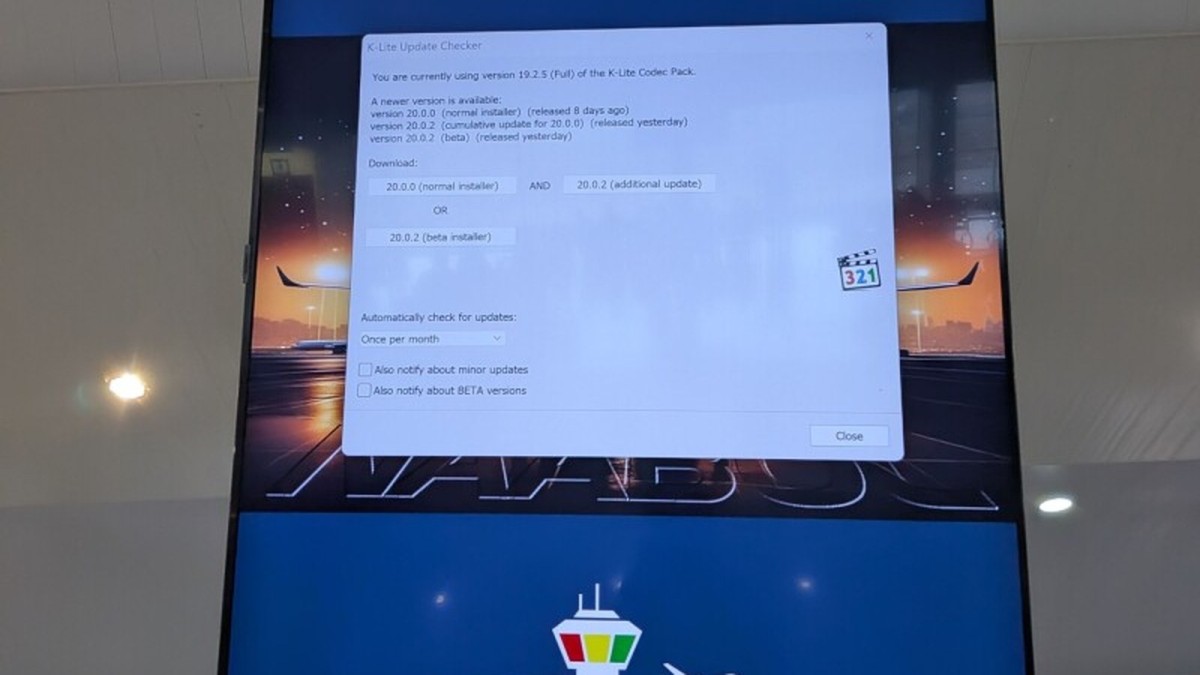
When I first saw a Windows 11 desktop pop up on a passenger display at Alcantarí International Airport in Sucre, Bolivia, I thought I’d stumbled onto a prank. Instead, it was a textbook case of how cheap shortcuts in the name of “just get something working” can turn a simple departure board into a security and brand nightmare. The display was running a full Windows install, complete with the K‑Lite Codec Pack dutifully prompting for updates, the Microsoft Store, Outlook, a weather widget, and a smattering of shortcuts that any office PC might have. None of that belongs on a screen meant to tell travelers when their flight leaves. It’s a reminder that the “just use Windows” mantra that many hyperscalers and VC‑backed signage vendors push is a recipe for operational embarrassment and, more importantly, business risk.
The real cost of a “just Windows” solution
What the Register captured was not a high‑end digital signage appliance but a generic Windows 11 box that someone cobbled together for a few hundred dollars. The K‑Lite Codec Pack, a third‑party collection of audio‑video components, was left fully enabled, and its updater barged onto the screen with a foreground prompt. On a workstation with a keyboard and mouse that might be tolerable, but on a public display it’s a glaring failure of basic configuration discipline.
From a founder’s perspective, the hidden costs are immediate. You’re paying for a Windows license, for the overhead of patch management, and for the risk that a rogue update can interrupt service at the worst possible moment. Those costs are often invisible in the initial price tag, but they show up as downtime, support tickets, and a tarnished reputation when passengers stare at a blinking “Update available” instead of a clean departure board.
Why “best practices” from the cloud don’t translate to signage
The industry loves to tout “best practices” like automated updates, containerised workloads, and cloud‑native monitoring. Those are great for web services that can roll back or scale horizontally, but they crumble when you’re staring at a static display glued to a wall. The K‑Lite update prompt is a perfect illustration: an automated update mechanism that assumes a user will click “Install”. In a signage context, there is no user, no keyboard, and no fallback UI. The result is a frozen screen that no one can control.
What you need instead is a locked‑down image, with updates applied offline during scheduled maintenance windows. That’s the difference between a system built for a data centre and one built for a public space. The latter demands a hardened, immutable configuration, not a rolling patch cycle that can pop up mid‑flight.
The hidden perils of pre‑installed Microsoft apps
Microsoft’s habit of pre‑installing apps like Outlook and the Store on Windows 11 is well known. In the Alcantarí case, Outlook appeared on the same desktop as the departure board. The Register notes that Outlook even surfaced during NASA’s Artemis mission and required technical support. If a space‑flight operation can’t dodge a stray email client, imagine the confusion when a passenger display starts pulling in email sync traffic or showing a weather widget you never asked for.
Every extra app is another attack surface, another source of telemetry, and another potential for performance degradation. For a small hosting operation that prides itself on lean, purpose‑built services, those bloatware components are a liability. Stripping them out at the image level is a non‑negotiable step if you want to keep your infrastructure tight and your service reliable.
Operational risk: the real impact on airlines and airports
Airlines already wrestle with delays, weather, and crew issues. Adding a flaky signage system to the mix only amplifies passenger frustration. The Register’s reader, Phil Pearce, could not dismiss the update prompt, leaving travelers with a “something else to watch” while wondering about their flight. That’s a minor annoyance in a small airport, but in a major hub the same glitch could cause misinformation, missed flights, and a cascade of customer service headaches.
From a risk management standpoint, any system that can present inaccurate or outdated information is a liability. If a display freezes on an old departure time, the airline could be held accountable for missed connections. The cost of a simple misconfiguration can therefore ripple through the entire travel ecosystem.
What this means for independent hosting providers
Independent hosting firms that specialise in on‑premise or edge deployments need to treat signage as a first‑class workload. That means offering curated OS images, hardened against unnecessary updates, and providing a management layer that can push vetted patches during off‑hours. The K‑Lite scenario is a cautionary tale: a cheap, generic Windows box may look like a quick win, but it erodes the value proposition of a provider who promises reliability.
Moreover, the market is saturated with VC‑funded startups that promise “AI‑driven signage” built on top of generic Windows VMs. Those solutions often hide the same update‑prompt problem behind a glossy UI. As a founder, you have to ask whether you’re selling a genuine edge solution or just repackaging a Windows desktop with a fancy dashboard.
Actionable steps to avoid the Alcantarí mistake
First, lock down the OS image. Remove all non‑essential Microsoft apps, disable automatic updates, and configure any third‑party components like K‑Lite to run silently or be updated manually. Second, implement a remote management plane that can push updates without user interaction – think of a simple SSH or PowerShell endpoint that you can script against during maintenance windows.
Third, conduct a risk assessment for every public‑facing display. Ask: what happens if the screen freezes? Who is responsible for clearing the prompt? Finally, document the configuration and train the on‑site staff. A display that shows a weather widget might be harmless, but one that shows an Outlook inbox is a red flag that someone didn’t think through the use case.
Bottom line: simplicity wins, hype loses
The Alcantarí incident is a micro‑example of a larger industry trend: the rush to slap a Windows box into any niche and call it a solution. It works until it doesn’t, and the cost of that failure is borne by the airline, the airport, and ultimately the passenger. As a founder who builds and runs real hosting infrastructure, I’ve learned that the cheapest path is rarely the cheapest in the long run. Choose a purpose‑built OS, lock down updates, and keep the UI to what the user actually needs – a clear, reliable flight board.
That’s the only way to keep the business risk low, the support tickets down, and the passengers happy. Anything else is just hype dressed up in a Windows desktop.
— Allan Ali, Founder
This article was produced with AI-assisted research and editorial support. Reporting is based on the source material cited below. Sources: The Register; theregister.com; Global1.News (03 October 2026).
By Allan Ali, Global1.News
What's Your Reaction?
 Like
0
Like
0
 Dislike
0
Dislike
0
 Love
0
Love
0
 Funny
0
Funny
0
 Wow
0
Wow
0
 Sad
0
Sad
0
 Angry
0
Angry
0

Publisher of Global1.News. Automation architect, systems builder, and the guy making sure the truth gets published.













Comments (0)